What Is a Meta Title? Meaning, Examples and SEO Guide
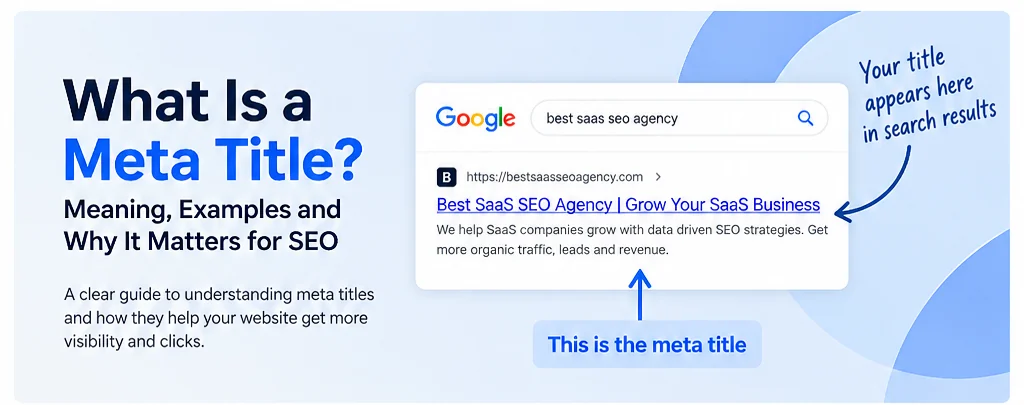
A meta title is the page title written inside the HTML <title> element. It helps describe the main topic of a web page and can be used by search engines when they create the clickable title shown in search results. Although people commonly call it a meta title, it is technically a title element rather than a meta tag.
That small distinction matters because a good title is written for both people and search systems. It should tell a searcher what the page offers without trying to force every possible keyword into one line.
What Is a Meta Title?
The meta title is the title assigned to a web page in its HTML. In a browser it can appear on the tab, and search engines can use it as one of the sources for a result title. Google may also consider visible headings, prominent page text and other signals when it generates a title link, so the title you write is an important input rather than a promise of exactly what will appear.
For example, a page about a free metadata checker might use a title such as Meta Title and Description Checker | BestSaaSSEOAgency. A visitor can understand the page before clicking because the title names the tool directly.
Where Does a Meta Title Appear?
You will usually notice a page title in a browser tab and in bookmarks. It can also become the blue clickable title in a search result. Search engines are not required to display the HTML title exactly as written. They can create a different title when another version appears more useful for a particular result.
This is why the goal is not to write for a rigid character formula. The better approach is to make the title specific, readable and consistent with the page itself. Google Search Central recommends descriptive and concise title text and warns against repeated boilerplate and keyword stuffing.
A Real Meta Title Example
The image below shows how the title of our Meta Title and Description Checker appeared in a search result. The large blue text is the title link. Under it is the search snippet. This makes the difference between a page title and a meta description easy to see.
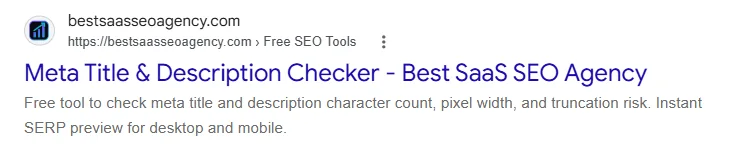
In this example, the title clearly names the tool and the description explains what a user can do with it. If you want to review your own page, our Meta Title and Description Checker measures the title, estimates pixel width, previews the snippet and highlights common optimization issues.
Why Does a Meta Title Matter for SEO?
A clear title helps search systems understand the subject of a page and helps people decide whether the result matches what they need. Relevance is more useful than repetition. A title that accurately describes the page can support a cleaner search experience, while a vague or overloaded title can make the result harder to understand.
We will cover the importance of a meta title for SEO in a dedicated guide, including how titles relate to relevance, search result clicks and page consistency. For now, the practical rule is simple. Write the title so a real person can quickly understand the page.
Is a Meta Title the Same as an H1?
No. The title element belongs in the document head, while the H1 is a visible heading inside the page content. They can be similar because both describe the same page, but they do not have to be identical. A search title may need to be compact, while the H1 can give the reader more context after arriving on the page.
What matters most is alignment. If the title promises one subject and the main heading introduces something unrelated, both visitors and search systems receive mixed signals.
How to Write a Useful Meta Title
Start with the actual purpose of the page. Put the clearest topic or benefit early enough that it is easy to recognize. Add a brand name when it is useful, but do not let branding crowd out the page topic. Avoid repeating the same phrase just to target several keyword variations.
Length still deserves attention because a title has limited visual space in search results, but there is no universal character count that guarantees display. Letters have different widths, devices vary and Google can generate a different title link. That is why our checker uses both character count and estimated pixel width rather than treating one number as a ranking rule.
How to Check Your Meta Title
You can view the page source and find the <title> element, but a checker is faster when you also want to judge how the title may look in search. Paste your title or analyze a public URL with our free meta title checker. You can compare desktop and mobile previews, review possible truncation, compare the title with the H1 and test alternative versions before changing the live page.
Use the results as guidance rather than a guarantee. Search engines can change how a result is presented based on the query and the page content.
Common Questions About Meta Titles
Is meta title the correct technical term?
It is a common SEO term, but the HTML specification uses the <title> element. Calling it a meta title is widely understood in SEO even though it is not technically a meta tag.
Should every indexable page have a unique title?
Each important page should have a title that accurately identifies its own content. Reusing the same generic title across many pages makes it harder for people to distinguish those pages in search results.
Can Google change my title in search results?
Yes. Google can generate a title link from several page signals. A descriptive HTML title remains valuable because it gives search systems a strong and direct description of the page.
Final Thoughts
A meta title is a small piece of HTML with an important job. It identifies the page, gives search engines useful context and helps searchers understand what they may find after clicking. Keep it accurate, specific and natural.
If you are editing a title now, test it with the Meta Title and Description Checker before publishing. For a deeper look at visual fit, read our meta title length guide, which explains character count, pixel width and truncation without treating one number as a ranking rule.
Sources and Further Reading
For search engine guidance, see Google Search Central guidance on title links. The guidance explains how Google creates title links and how page owners can provide clear title signals.